


Building UXDuty: how far can one designer go?
Russell Isabelle covers his journey on building UXDuty, an analysis tool for FCA regulated firms conforming to Consumer Duty, using AI.


Over the past few years I’ve been trying to create a useful UX research tool that has moved through multiple names and iterations, from concept to something now fully functional.
I’m a designer by trade who can code frontend, with a working but limited knowledge of backend technology so it has not been a traditional product delivery process. Advancements in AI have allowed me to handle the implementation using a design-led approach. In total I’ve had around one hour of development guidance, mainly to set up versioning.
Through each version, the app goal has remained consistent: help teams understand where users struggle in digital journeys and turn that into something measurable and actionable. The latest version of this idea is called UXDuty.
What is UXDuty?
UXDuty is a journey analysis tool for digital products, built for FCA regulated firms conforming to Consumer Duty. It identifies at-risk customer journeys and highlights where users experience friction, confusion and drop-off by combining behavioural analytics with WCAG accessibility and UX heuristic evaluations.
The UX heuristics use a bespoke set tailored to financial services, surfacing the UX-observable aspects of all four FCA Consumer Duty outcomes: products and services, price and value, consumer understanding and consumer support.
Two major iterations since conception
UXDuty v1 was a usability testing app at its core, focused on users completing tasks and recording their outcomes. It existed to explore how structured testing could be captured and interpreted to surface issues and recommendations.
A v1 prototype was created and tested through live demos, including:
A prospective firm with around 7 million customers
A cognitive accessibility institute
A qualitative researcher from a major global gaming firm
Multiple team members at Indulge
Those sessions were less about presenting a finished product and more about observing reactions closely and understanding where the concept could create the most value.
UXDuty v2 took onboard the feedback from v1, and became the first fully functional implementation. It runs live scans of customer journeys, applying various UX checks and produces a Consumer Duty risk score with prioritised issues and recommendations.


What it actually took to build
Even using AI, I have spent well over a thousand hours shaping this product from v1 to v2 across design, development and demos. In the last few months alone, hundreds of hours have gone into turning it into a working system.
The process became highly iterative and more productive moving from Figma to Claude. I trusted Claude to handle much of the back-end development while I refined features, styling and UX issues in real time as they appeared in the product.
Another important part of the process was refining the scan quality itself. I continuously fed back what constituted useful or misleading UX findings based on my own experience, helping shape more consistent outputs and risk scoring.
As the system grew, operational issues started appearing during idle periods or failed scans. Processes would hang, ports would stay occupied, and parts of the system would break. To manage this I created a startup.md file which resets services, clears caches and restarts processes before demos or new sessions.
As the product matured, I also moved from a loosely structured local setup into a proper Git workflow. Earlier versions lived almost entirely on my machine with occasional backup ZIPs stored in Google Drive. Version control created a clearer structure for future development and made the system safer to evolve.
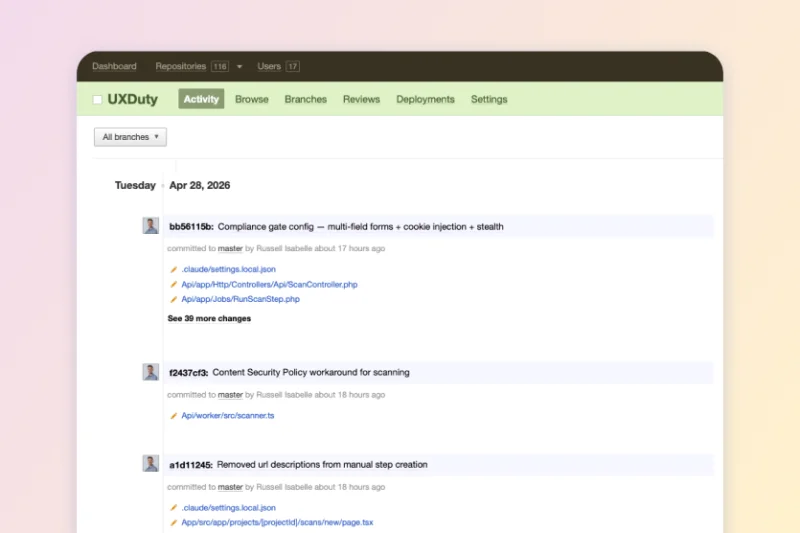
Where AI accelerated things
AI dramatically reduced the time and expertise required to build and iterate on the app.
Areas where it accelerated development included:
Backend and frontend scaffolding
Database and queue setup
Browser automation workflows
Accessibility analysis pipelines
UI iteration and state handling
Performance optimisation through parallel execution
When implementation approaches became unclear, I would often use Claude Chat and sometimes ChatGPT as virtual development support to explore different options and compare viewpoints before deciding how to proceed.
A large part of the system architecture emerged this way, including the combination of a Next.js front-end, Laravel back-end, scanning workers, and markdown-based analysis structures used to guide scoring and recommendations based on UX principles.
Where AI struggled
The limitations became more obvious as system and scan tests have increased in complexity. For example, financial services websites introduced gating, security layers and bot detection that frequently broke scanning flows.
Some problems were difficult to isolate because they emerged from interactions between services rather than single bugs. Queue timing, browser state and frontend rendering could all affect each other in unexpected ways.
There were also moments where overly complex technical solutions were proposed for problems that ultimately needed simpler operational fixes. Scan speed performance and output consistency are two key areas I’m actively working on improving.
I also broke three separate Claude Code sessions during development and am currently working within a fourth. Usually this happened when the processing became too complex for the session to handle.
Watch the V2 demo
Closing thoughts
A senior team member reviewed the UX of several competitor websites for our client. I ran the same journeys through UXDuty. The response from them was “lots of similarities”. That was a significant signal because the app is now surfacing patterns that are aligned with manual human analysis.
In the short term, this app has value internally by speeding up our UX analysis work, so more time can be spent adding value elsewhere. Longer term, it presents an opportunity for product teams and firms that might be looking for automated UX analysis as part of their Consumer Duty reporting.
The public-facing website is nearly ready to launch and the domain uxduty.com has been secured, so watch this space over the coming weeks.
If you’re interested in a UXDuty demo and a free UX scan of your website, please get in touch.